
Table of Content
CountGod: The Premier Countdown App
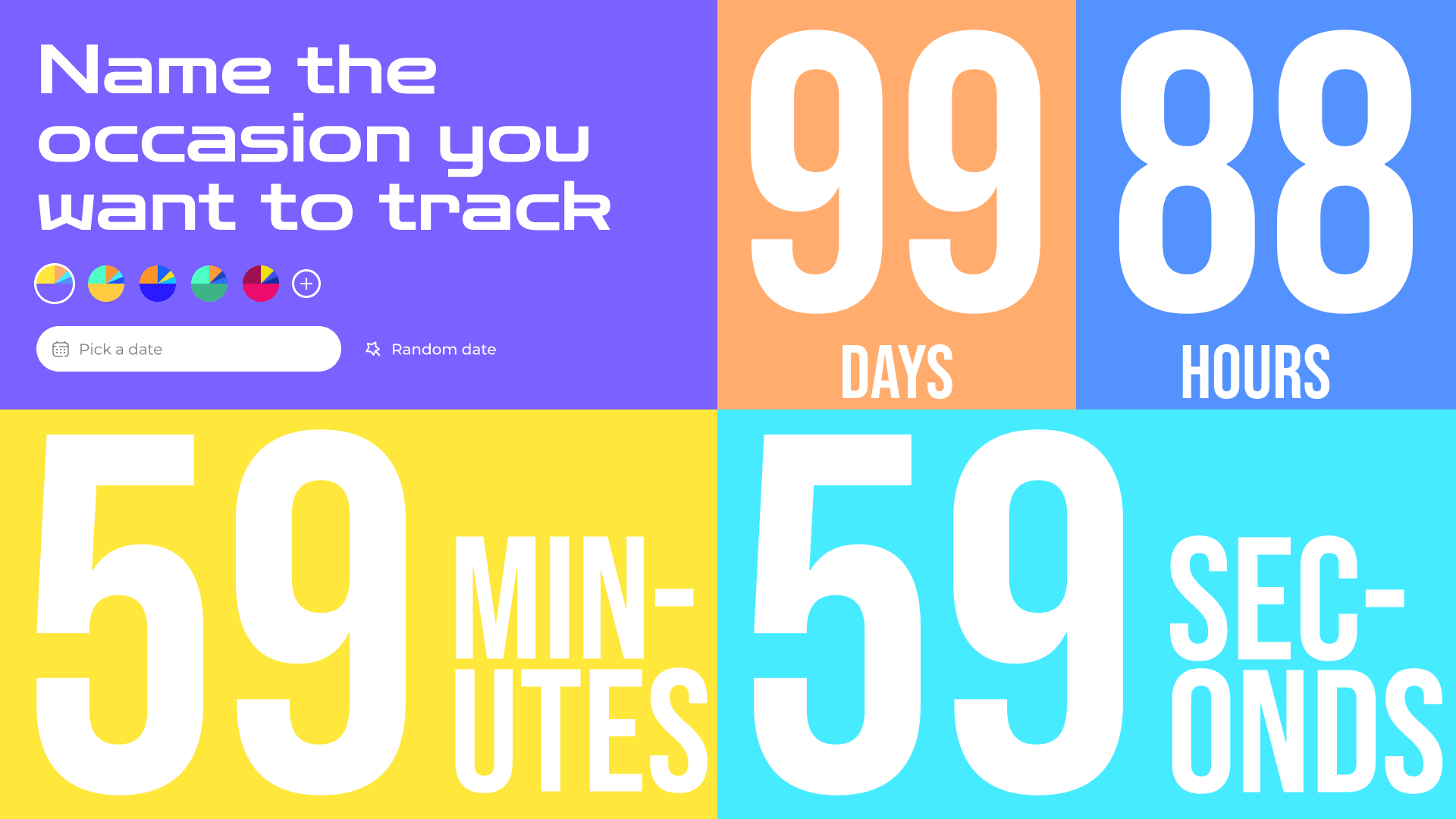
Introduction:
CountGod is more than just a countdown app; it's an experience that aesthetically fuses functionality with design. Crafted meticulously by a renowned designer, CountGod is not only about counting down to a date, but also about expressing oneself through customizable features and an immersive user interface.
Core Features:
- Customizable Countdown: Choose your desired date or let the app pick a random one for you.
- Stunning Color Palettes: Select from curated color schemes or craft your own unique palette using our intuitive color picker.
- Personal Touch: Name your countdown event to add that personal feeling or reminder.
- Responsive Design: Enjoy a seamless experience on any device, whether it's a desktop, tablet, or mobile phone.
On the Horizon (Future Features):
- Account Authentication: Secure your countdowns and access them from anywhere.
- Multiple Countdowns: No need to limit yourself to one event. Anticipate multiple occasions at once!
- Engaging Experiences: Enjoy special themes, sound effects, and other exciting additions on selected dates or random surprises.
Background:
As part of my journey to secure a position as a Vue.js developer, I embarked on creating CountGod—a testament to what Vue.js is capable of in terms of interactive UI/UX design and seamless functionality. Through this project, I aimed to demonstrate not just my technical proficiency but also my commitment to user experience and attention to detail. This app serves as a showcase of my ability to translate complex requirements into intuitive and beautiful digital solutions.
Challenges Faced:
Working on CountGod wasn't just about building a visually pleasing countdown app; it was an expedition through numerous technical and design challenges that tested my proficiency with Vue.js and JavaScript. Here's a deeper dive into some of the challenges I faced and how I overcame them:
1. Time Management with Vue.js & JavaScript:
Managing time between dates is crucial for a countdown app. However, dealing with time in any programming language can be tricky. With Vue.js and JavaScript, I had to ensure accurate time calculations while catering to various time zones. This was achieved by:
- Understanding the Date Object: Deep-diving into JavaScript's Date object and its associated methods allowed for accurate date and time manipulations.
- Vue.js Reactivity: By leveraging Vue.js's reactivity, I could seamlessly update the countdown in real-time, providing users with a dynamic experience.
// Define a reactive variable to hold the current time
const date = ref("Pick a date");
const now = ref(Date.now());

// Watch for changes to the reactive variable and update it every second
watchEffect(() => {
  setInterval(() => {
    now.value = Date.now();
  }, 1000);
});

// Define a computed property to calculate the time remaining until the selected date
const elapsed = computed(() => {
  // Convert the reactive variable to a Date object
  const nowDate = new Date(now.value);

  // Convert the selected date to a Date object
  const selectedDate = new Date(date.value);

  // Calculate the midnight of the selected date in the local time zone
  const midnight = new Date(
    selectedDate.getFullYear(),
    selectedDate.getMonth(),
    selectedDate.getDate()
  );

  // If the midnight of the selected date has already passed, return undefined
  if (midnight < nowDate) {
    return;
  }

  // Calculate the time remaining until midnight of the selected date
  return midnight - nowDate;
});

// Define computed properties to calculate the remaining days, hours, minutes, and seconds
const computedSeconds = computed(() => {
  return Math.floor((elapsed.value / 1000) % 60);
});
const computedMinutes = computed(() => {
  return Math.floor((elapsed.value / 1000 / 60) % 60);
});
const computedHours = computed(() => {
  return Math.floor((elapsed.value / (1000 * 60 * 60)) % 24);
});
const computedDays = computed(() => {
  return Math.floor(elapsed.value / (1000 * 60 * 60 * 24));
});
2. Smooth Transitions with Vue.js:
To ensure a fluid user experience, I harnessed Vue.js's built-in transition components. This allowed for:
- Seamless State Transitions: Whether it was switching between color palettes or countdowns, the user experiences smooth visual transitions.
- Component Animations: Each countdown and UI change had an associated animation, giving the app a polished look.
<template>
  <Transition class="row-start-1 row-end-2">
      <span v-if="Number(number.number)" class="number " id="number" :key="number.number">{{ number.number }}</span>
      <span class="number" v-else>
        0
      </span>
    </Transition>
</template>
<style scoped>
.v-enter-active,
.v-leave-active {
  transition: all 0.2s ease;
}

.v-enter-from,
.v-leave-to {
  opacity: 0;
}

.v-enter-to,
.v-leave-from {
  opacity: 1;
}
</style>
3. Modularizing with Composables:
To maintain clean and maintainable code, I abstracted various functionalities into composables. This:
- Enhanced Reusability: Components could be used across different parts of the app without redundancy.
- Improved Code Readability: By breaking down complex functionalities into bite-sized composables, the codebase became more organized and easier to understand.
const {
  date,
  label,
  computedDays,
  computedHours,
  computedMinutes,
  computedSeconds,
  isEditing,
  appearInput,
  changeTitle,
  newTitle,
  title,
  selectRandomDate,
} = useCountdown();
const {
  colorsPalettes,
  colorsPalette,
  color,
  createColors,
  computedColorFour,
  computedColorThree,
  computedColorTwo,
  computedColorOne,
  header,
  createPalette,
} = useTriadColors();
4. Crafting the Dynamic Color Palette:
One of the standout features of CountGod is the ability to generate a complete color palette from a single input. To achieve this:
- RGB to HSL Conversions: I implemented scripts to convert user-input RGB values to HSL, enabling dynamic color manipulations.
- Color Theory in Practice: Utilizing the concept of color triads (and quints), I calculated offsets to create harmonious color combinations for the user.
function quintColors(rgb) {
  let [h, s, l] = rgbToHsl(...rgb);

  let offset = 1 / 5; // Divide the hue circle by 5
  // Adjust saturation and lightness for a more appealing look.
  // s = Math.min(s * 0.85, 1);  // Reduce saturation by 15%
  //l = l > 0.5 ? Math.max(l * 0.9, 0) : Math.min(l * 1.1, 1); // Darken if too light, lighten if too dark
  let color1 = rgbToHex(...hslToRgb((h + offset) % 1, s, l));
  let color2 = rgbToHex(...hslToRgb((h + 2 * offset) % 1, s, l));
  let color3 = rgbToHex(...hslToRgb((h + 3 * offset) % 1, s, l));
  let color4 = rgbToHex(...hslToRgb((h + 4 * offset) % 1, s, l));

  return [color1, color2, color3, color4];
}
5. Reactive Theme Customization:
Customizability is at the heart of CountGod. I took on the challenge of allowing users to modify the app theme on-the-fly:
- Reactive Styling: By leveraging Vue.js's reactive properties, I facilitated the dynamic application of user-selected themes.
- Optimization: To ensure that theme changes didn't hinder performance, I applied best practices to keep the app optimized even with constant theme updates.
watch(
  colorsArray,
  () => {
    header.value.style.background = color.value;
    computedColorOne.value;
    computedColorTwo.value;
    computedColorThree.value;
    computedColorFour.value;
  },
  { deep: true }
);
const computedColorOne = computed(() => {
  return colorsArray.value[0];
});
const computedColorTwo = computed(() => {
  return colorsArray.value[1];
});
const computedColorThree = computed(() => {
  return colorsArray.value[2];
});
const computedColorFour = computed(() => {
  return colorsArray.value[3];
});

const createColors = () => {
  const colors = quintColors(hexToRgb(color.value));

  colorsArray.value = [...colors];
};
By navigating through these challenges, I further honed my skills in Vue.js, JavaScript, and UX design, reinforcing my capabilities to craft intuitive, efficient, and engaging digital solutions.